
Download Cinebench r23 and Cinebench 2024
Cinebench measures your processor’s real performance using Cinema 4D’s rendering engine. PC builders, content creators, and hardware reviewers rely on it to test CPU speed, validate system stability, and compare processors before buying. The software runs actual rendering tasks, not synthetic math. Your score shows exactly how your CPU handles video encoding, 3D work, and heavy multitasking. Available free for Windows, macOS, and ARM systems.
What is Cinebench
Maxon develops Cinebench as a free CPU benchmark tool. The software uses the same Cinema 4D engine that studios use for film production and architectural visualization. Each test renders complex 3D scenes to measure single-core responsiveness and multi-core throughput. Unlike generic benchmarks, Cinebench simulates what your processor does during creative work. The Redshift GPU test arrived in 2024, letting you evaluate graphics card performance alongside CPU testing. Scores are repeatable across platforms, making comparisons accurate and fair.

What is Cinebench R23
Cinebench R23 ranks as the most widely used CPU benchmark with a massive score database spanning thousands of processors. Released in June 2020, it runs a 10-minute rendering test that measures both single-core and multi-core performance using Cinema 4D’s advanced rendering engine.
Hardware reviewers, overclockers, and PC builders prefer R23 for CPU comparisons because the extended test duration reliably exposes thermal throttling and power limit issues that shorter benchmarks miss. The 235 MB download supports Windows 7 through 11 and macOS 10.13.6 or newer, requiring just 4GB RAM for operation. Typical scores range from 10,000 points for budget 6-core chips to over 40,000 for high-end 16-core processors like the AMD Ryzen 9 9950X or Intel Core i9-14900K.
Is There a Cinebench R24 Version?
No official Cinebench R24 release exists from Maxon. The version naming skipped from R23 directly to Cinebench 2024. Some sites like ComputerBase reference “Cinebench R24” when discussing the 2024 release, but the correct name is simply Cinebench 2024. This version launched in September 2023 with CPU and Redshift GPU testing. Download Cinebench 2024 for the latest benchmark or use R23 for CPU-only testing with broader comparison data.
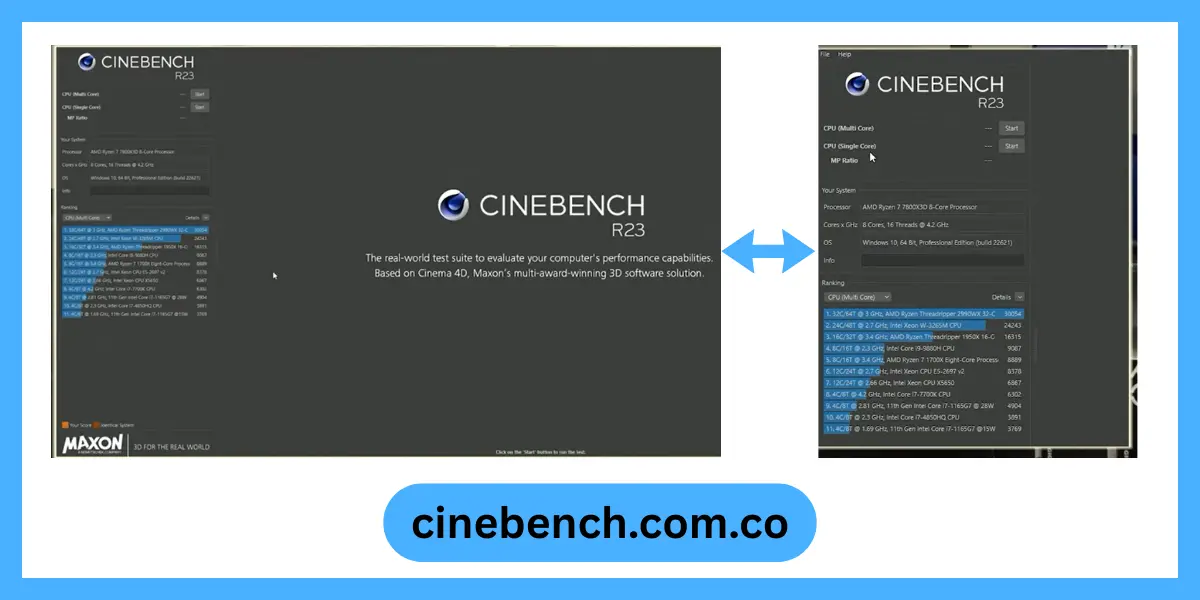
Download Cinebench
Get Cinebench directly from Maxon’s official site to ensure file integrity and security. All versions install without registration or personal information. Choose the release that matches your testing needs. Newer versions test modern hardware better, while legacy releases provide historical comparison data.
Cinebench 24
Latest release with CPU and GPU testing using the Redshift rendering engine for combined workload evaluation
| Windows | 10/11 |
| RAM | 16GB |
| Size | 1.3 GB |
Cinebench R23
Most popular version for CPU-only testing with extensive score database and broad reviewer adoption
| Windows | 7/8/10/11 |
| RAM | 4GB |
| Size | 235.9 MB |
Cinebench R20
Longer rendering scene than R15 with better multi-thread scaling detection for high core count processors
| Windows | 7/8/10 |
| RAM | 4GB |
| Size | 208.9 MB |
Cinebench R15
Historic benchmark with massive comparison database and lightweight system requirements for older hardware
| Windows | Vista/7/8/10 |
| RAM | 2GB |
| Size | 81.0 MB |
Cinebench R11.5
Legacy release for testing very old systems or maintaining continuity with archived benchmark data
| Windows | XP/Vista/7 |
| RAM | 1GB |
| Size | 138.3 MB |
Cinebench R10
Oldest available version for historical documentation or extremely dated hardware compatibility testing
| Windows | 2000/XP/Vista |
| RAM | 512MB |
| Size | 49.8 MB |
Cinebench R23 and 2024 Scores-Processor Benchmark Reference
| Processor | R23 Multi | R23 Single | CB 2024 Multi |
| AMD Ryzen 9 9950X | 41,000+ | 2,200+ | 1,400+ |
| Intel i9-14900K | 38,000+ | 2,100+ | 1,300+ |
| AMD Ryzen 7 7700X | 21,000+ | 1,950+ | 950+ |
| Apple M3 Pro | 15,000+ | 1,800+ | – |
Why Choose Cinebench
Real-World Testing
Cinebench renders actual 3D scenes instead of running arbitrary calculations. Your score directly predicts performance in video editing, 3D modeling, and content creation software.
Industry Standard Recognition
Every major tech publication uses Cinebench for processor reviews. OEMs test systems before shipping. Your score can be compared against thousands of published results.
Cross-Platform Consistency
Run identical tests on Windows and macOS. ARM support means Apple Silicon benchmarks match x86 results fairly. Mixed IT environments get comparable data.
No Registration Required
Download directly from Maxon without creating accounts. Install offline if needed. Your data stays private.
Stability Validation
The 10-minute stress option reveals thermal throttling, power limits, and cooling problems. Overclockers use it to verify system stability under sustained load.
Broad Hardware Support
Test anything from budget laptops to 96-core workstations. The benchmark scales across entry-level chips and high-end processors equally well.
GPU Testing Included
Cinebench 2024 adds Redshift rendering to test modern graphics cards. Content creators get CPU and GPU scores from one tool.
Historical Data Available
Legacy versions let you compare older hardware. R15 and R20 scores exist for nearly every processor released since 2013.
Zero Cost Access
Download, install, and test unlimited times. No trial periods, no feature locks, no subscriptions. Maxon provides it completely free.
key Features of Cinebench
Single-Core Performance Testing
Measures one CPU core’s speed for tasks like gaming, application launches, and responsive computing. Scores typically range from 1,000 to 2,300 points depending on processor generation and clock speed.
Multi-Core Throughput Analysis
Tests all cores simultaneously to show rendering speed, video encoding capability, and parallel processing power. Modern 8-core chips score 15,000 to 25,000 points in R23.
MP Ratio Calculation
Divides multi-core score by single-core score to reveal scaling efficiency. Ratios below expected values indicate thermal throttling, power limits, or scheduling problems that need investigation.
Redshift GPU Benchmark
The 2024 version tests graphics cards using production rendering workloads. Ray tracing performance gets measured accurately, helping creators choose GPUs for 3D and video work.
Thermal Stress Detection
Running multiple loops exposes heat saturation and clock speed drops. You can identify inadequate cooling before stability issues appear during actual work.
Repeatable Scene Rendering
Cinebench uses fixed 3D scenes that produce consistent scores. The same hardware tested twice gives nearly identical results, within 1-2% variance under controlled conditions.
Background Process Detection
Scores drop when other apps consume CPU resources. The benchmark indirectly shows if system cleanup is needed before running production workloads or important renders.
Power Limit Identification
Laptops and small form factor PCs often hit power restrictions during testing. Lower than expected scores reveal if your system needs power plan adjustments or better cooling.
Version Compatibility Options
Legacy releases support older Windows versions and legacy hardware. You can benchmark Windows 7 systems with R15 when newer versions won’t run.
Command Line Support
R23 and 2024 accept command line arguments for automated testing. IT departments can script benchmark runs across multiple machines for fleet validation.
Offline Operation
No internet connection required after installation. Test air-gapped systems, isolated workstations, or network-restricted environments without connectivity concerns.
Result Export Features
Save scores as text files or screenshots. Documentation for warranty claims, performance tracking over time, or comparing before and after hardware changes becomes simple.
How to Run a Cinebench Benchmark
Preparation Steps
Close all running programs. Background applications steal CPU resources and lower your score by 10% to 30%. Disable Windows updates temporarily. An update starting mid-test ruins your results. Laptop users must plug in the AC adapter. Battery mode severely limits processor performance.
Running the Test
- Launch Cinebench. Select either single-core or multi-core test.
- Click Start. Don’t touch your computer during the test.
- Multi-core tests take about 10 minutes. Single-core tests finish in 2 minutes.
- Your score appears immediately after completion. Take a screenshot for future reference.
Using Cinebench as a Stress Test
Cinebench R23 includes a stability test mode. It loops the benchmark repeatedly for extended periods.This reveals thermal and power delivery issues. Your score should remain stable across multiple runs.
If scores drop after 3 or 4 loops, check your cooling solution. The CPU is likely throttling due to heat.Monitor temperatures during testing. Most CPUs safely handle 80°C to 90°C under load. Sustained temps above 95°C indicate cooling problems.
How to use Cinebench Video Tutorial
Should I use Cinebench 2024 or R23?
Use Cinebench R23 for CPU-only testing and comparing scores with hardware reviews since it has the largest database. Choose Cinebench 2024 if you need GPU benchmarking with Redshift rendering for content creation workflows. The versions use different scenes, so scores aren’t comparable between them. Most reviewers still use R23 for processor comparisons, making it better for cross-referencing your results.
Cinebench on Linux
Maxon doesn’t provide a native Linux version. You can run Windows builds through Wine or Proton compatibility layers. Results vary depending on your Wine configuration. Performance may not match native Windows execution.
Linux users have better alternatives:
- Blender Benchmark tests rendering performance with similar workloads. It runs natively on Linux.
- Phoronix Test Suite offers comprehensive system testing including CPU benchmarks.
- Geekbench provides cross-platform comparison data between Linux, Windows, and macOS.
Optimizing Your Score
BIOS Settings
Enable PBO (Precision Boost Overdrive) on AMD systems. This removes power limits and allows higher sustained clocks. Activate Turbo Boost on Intel processors. Verify it isn’t disabled in BIOS. Optimize RAM timings and speed. Faster memory improves Cinebench scores by 2% to 5%.
Cooling Improvements
Clean dust from CPU cooler fins. Blocked airflow reduces performance. Reapply thermal paste if your CPU is over two years old. Dried paste increases temperatures. Verify your cooler mounting pressure. Loose mounts create air gaps that hurt thermal transfer. Adjust fan curves for higher speeds during stress tests.
Software Tweaks
Disable Windows Defender during testing. Real-time scanning consumes CPU cycles. Close RGB control software. These utilities surprisingly impact benchmark scores. Fresh Windows installations score 2% to 5% higher than aged systems with accumulated software.
Cinebench vs Other Benchmarks
Cinebench vs Geekbench
Geekbench tests mixed workloads across multiple applications. It provides broader performance insights. Cinebench focuses solely on rendering. This makes it more relevant for content creators. Run both benchmarks for complete CPU evaluation.
Cinebench vs CPU-Z
CPU-Z Bench completes in seconds. It offers quick performance snapshots. Cinebench runs longer and stresses thermal solutions more thoroughly. It better predicts sustained performance. Both tools are free. Use them together for quick and detailed testing.
Cinebench vs Prime95
Prime95 purely tests stability. It generates maximum heat but doesn’t produce comparable scores. Cinebench combines performance measurement with stress testing. You get usable data plus stability validation. Overclockers use both. Prime95 for stability, Cinebench for performance verification.
Troubleshooting Common Issues of Cinebench R23
Low Scores Despite Good Hardware
Check CPU temperatures during the test. Thermal throttling cuts performance dramatically. Verify your Windows power plan. Switch to High Performance mode in power settings. Close all background applications. Check Task Manager for hidden processes consuming CPU resources. Update your motherboard BIOS. New BIOS versions often improve CPU performance and power delivery.
Laptop Scores Lower Than Expected
Laptops throttle aggressively to protect components. Thin chassis can’t dissipate heat like desktop coolers. Expect 25% to 40% lower scores compared to desktop CPUs with identical model numbers. Always test on AC power. Battery mode limits performance severely. Elevate your laptop for better airflow. A cooling pad helps maintain performance during extended tests.
Cinebench Won’t Launch
Update your graphics drivers. Outdated drivers cause crashes on startup. Install Visual C++ Redistributables from Microsoft. Cinebench requires these runtime libraries. Run Cinebench as administrator. Right-click the icon and select “Run as administrator.” Temporarily disable antivirus software. Some security programs block benchmark tools.
Cinebench 2025 and Cinebench 2026
Maxon never released a Cinebench 2025. The version after Cinebench 2024 jumped directly to Cinebench 2026, released on December 29, 2025. Cinebench 2026 adds support for Nvidia Blackwell GPUs (5000 series), AMD Radeon 9000 series GPUs, Apple M4 and M5 systems, and updates to the latest version of the Redshift rendering engine. Maxon, it also introduces a new SMT CPU test that lets users directly measure the performance gains from Simultaneous Multithreading compared to single-threaded execution. Maxon Scores from Cinebench 2026 use a recalibrated range and cannot be compared to results from Cinebench 2024 or earlier versions. Maxon Knowledge Base
Final Word About Cinebench
Cinebench remains the standard for CPU performance testing because it measures real rendering workloads. The scores directly predict content creation speed, making it valuable for professionals and enthusiasts. Free access, cross-platform support, and decades of comparison data make it irreplaceable. Download R23 for pure CPU testing or grab 2024 for combined CPU and GPU evaluation. Run it before buying new hardware, after system changes, or when performance seems off. Your scores provide concrete data for informed decisions.